Price comparison for parts buyers
Find the cheapest supplier for every part you buy.
Upload your suppliers’ price lists and what you need to buy. PriceHuddle compares every line, including logistics, bonuses and currencies, and tells you what to order where.
30 days free · no credit card · cancel any time

An analysis of a 260-line order across four suppliers. Demo data.
- Any layout
- Excel, CSV or pasted cells. You point at the columns once per supplier.
- 1,000,000
- rows per price list, imported in the background.
- All brands
- compared in one run, not one brand at a time.
- 30+
- currencies, converted at the daily ECB rate.
Why spreadsheets get it wrong
The list price is not what you pay.
A supplier that looks cheapest on paper can be the most expensive once freight, year-end bonus and the exchange rate are in. PriceHuddle compares the price you really pay, for every line, every time.
Example · one part from a UK supplier
How it works
From supplier files to orders in four steps.
-
1
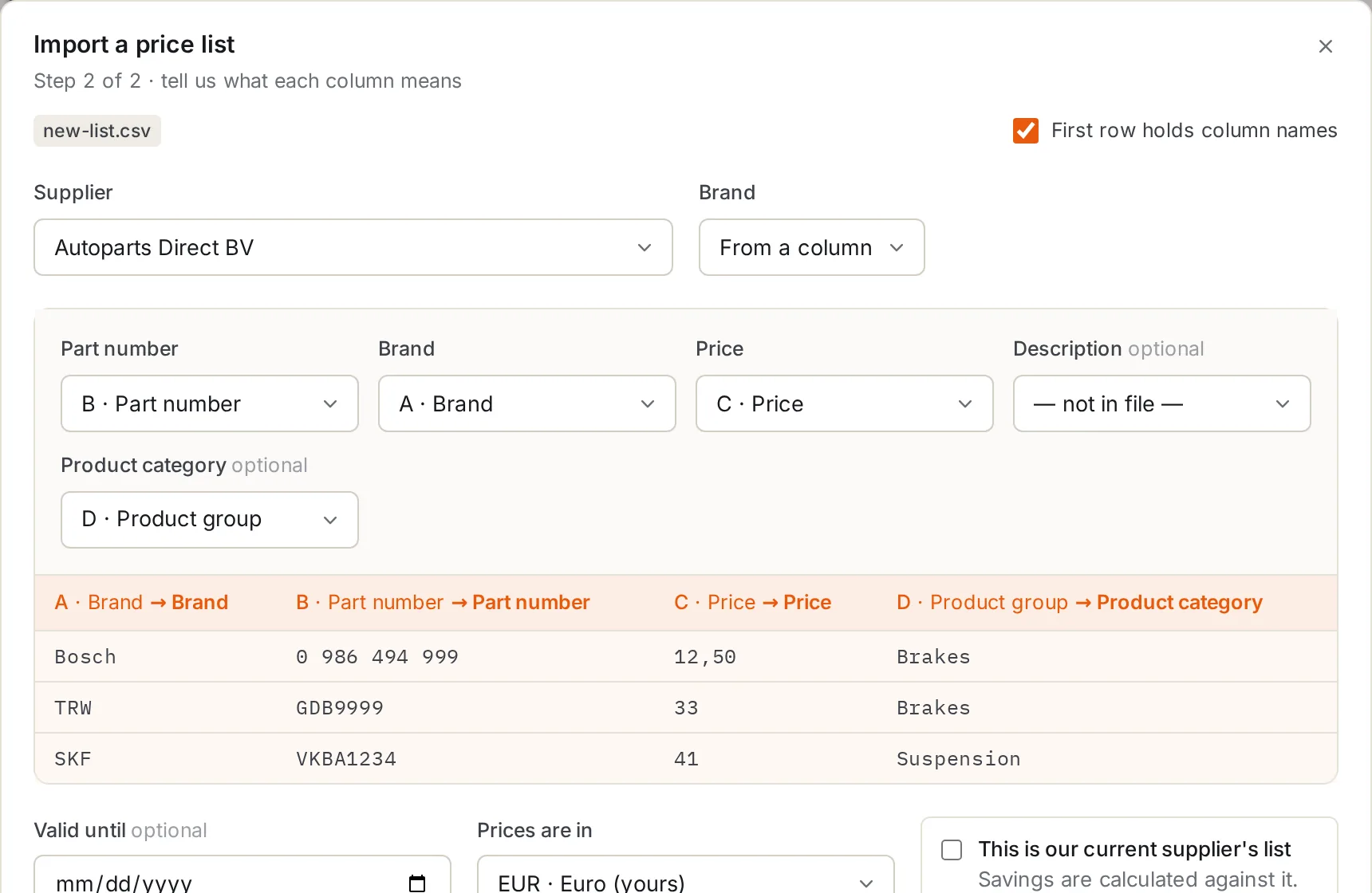
Import your suppliers’ price lists
Drop in the file as the supplier sent it. PriceHuddle recognises the columns, cleans up part numbers (0 986 494 123 and 0986494123 are the same part) and remembers the layout for next time.
-
2
Import what you need to buy
A list of part numbers and quantities, all brands in one file. Add to it later or replace it.
-
3
Run an analysis
Every line is compared with every price list. You see the cheapest supplier per line, the runner-up, and what you save against your current supplier.
-
4
Download the orders
One sheet or file per supplier, in the supplier’s own currency, ready to send. Leave a supplier out this round and its lines move to the next-cheapest.
Features
Everything a buyer checks by hand, done for every line.
The real price, not the list price
Logistics costs, supplier bonus and a currency surcharge are applied to every price, so a cheap list with expensive freight does not win by accident.
The best mix of suppliers
Fewer suppliers means fewer orders. See what one, two or three suppliers would cost, with minimum order values checked for each.
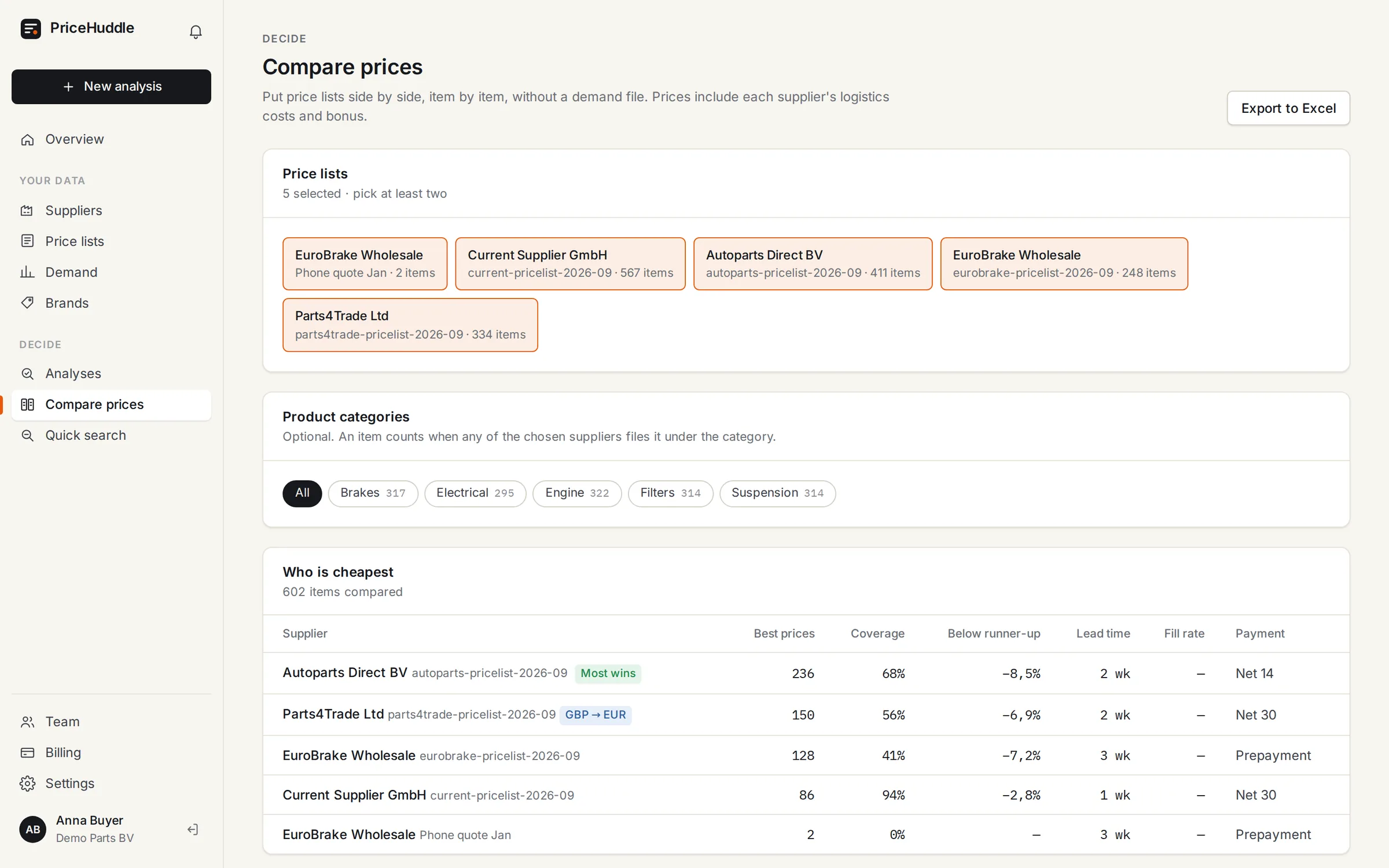
Compare lists without an order
Put two to twenty price lists side by side, item by item, and see who is cheapest where and by how much.
Quick search
Paste up to 50 part numbers and get every supplier’s real price back, cheapest first.
Categories and brand spellings
Filter by product category, and teach it once that “Bosch Automotive” means Bosch, so every future list matches.
Built for a team
Invite colleagues, get notified when an import or analysis is done, and when a price list is about to expire.
Compared with a spreadsheet
Stop rebuilding the same comparison every month.
| Task | In a spreadsheet | In PriceHuddle |
|---|---|---|
| Matching part numbers written differently | VLOOKUP, then fixing spaces and dashes by hand | Automatic, for every list |
| Logistics, bonus and currency | Extra columns per supplier, easy to forget | Applied to every price |
| Many brands in one order | One sheet per brand | One analysis for everything |
| Which suppliers to order from | Guesswork | Best mix, with minimum orders checked |
| Order files per supplier | Copy and paste | One click |
Pricing
One plan for your whole company.
30 days free on any plan. Prices exclude VAT.
Starter
For a buyer who compares a few suppliers every month.
€149 per month
- Up to 10 suppliers
- Unlimited price lists and analyses
- Excel order export
- Email support
Pro
For teamsFor purchasing teams that compare everything, all the time.
€299 per month
- Unlimited suppliers
- Team members and roles
- Brand aliases and merging
- Priority support
FAQ
Questions buyers ask.
Do my suppliers need to do anything?
No. You import the price lists they already send you, in whatever Excel or CSV layout they use.
Which files can I import?
Excel (.xlsx), CSV, or cells pasted straight from Excel, up to a million rows per list. Old .xls files: save them as .xlsx first.
What if a supplier prices in another currency?
Set the supplier’s currency once. Prices are converted at the European Central Bank’s daily reference rate, and every analysis keeps the rates it used, so old results never change.
Who can see my price lists?
Only people in your own company account. Each company’s suppliers, prices and analyses are kept separate from every other company’s.
What happens when the trial ends?
After 30 days, choose a plan to keep importing and running analyses. If you don’t, your data stays readable; nothing is deleted.
Can I cancel?
Yes, any time, from the billing page. Monthly plans stop at the end of the month you paid for.
See what you could save on your next order.
Import two price lists and one order. Your first comparison takes minutes.